About me
Service Center

Service Center
My Role
Company
Team
Status
When
Design owner
Oracle
Anna Almberg, Akhil Oswal,
Mariana Garcia
Shipped
2026
Problem
Traditional customer service applications are overwhelming and have a steep learning curve in an industry of high turnovers training is expensive. At the same time Oracle moved to a new design system and philosophy (Redwood) of what professional software experience should be like. It just had a limited number of page templates and components that were needed and unique to customer service use cases so the first version was overly complicated and did not satisfy customer’s needs.
Objective
Creating 1 application which can replace Oracle’s 3 existing customer service tools.
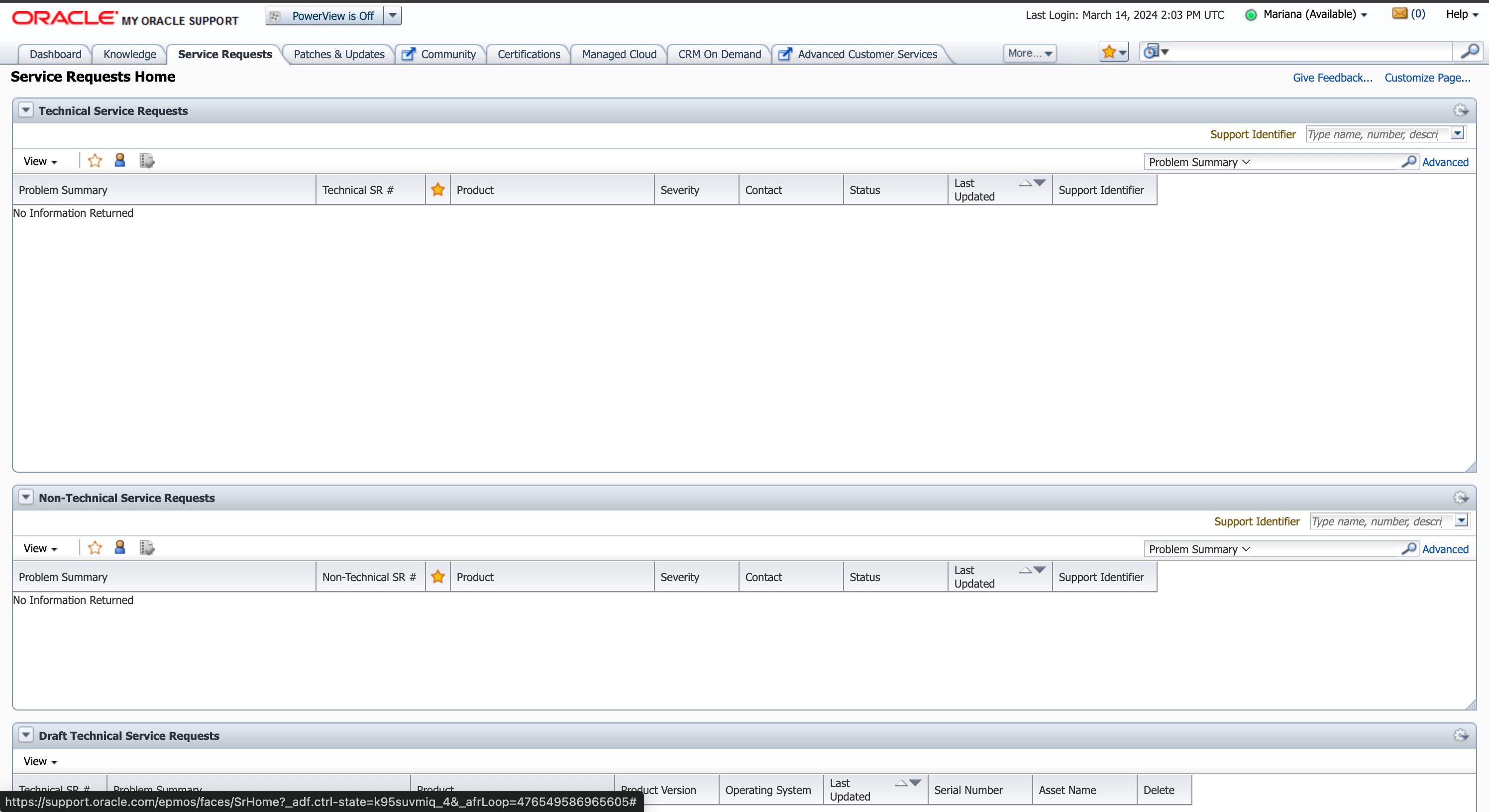
Custom internal service tool (B2B)
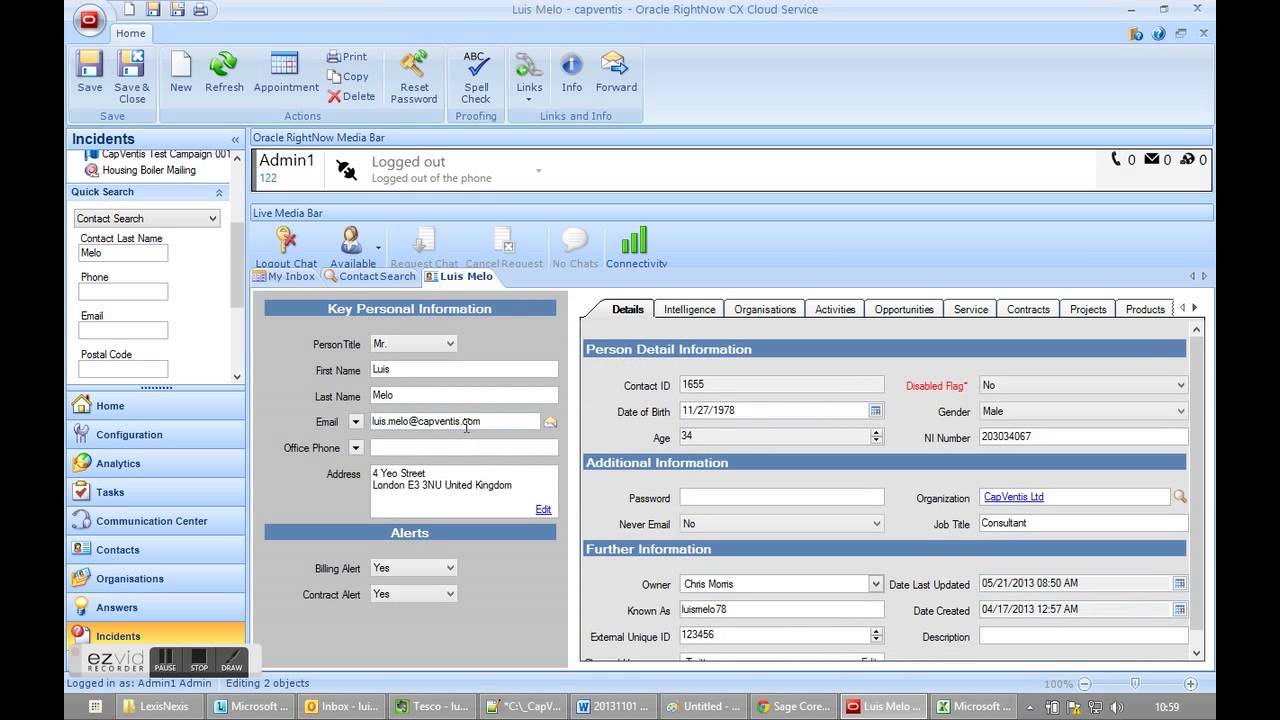
RightNow (B2C)
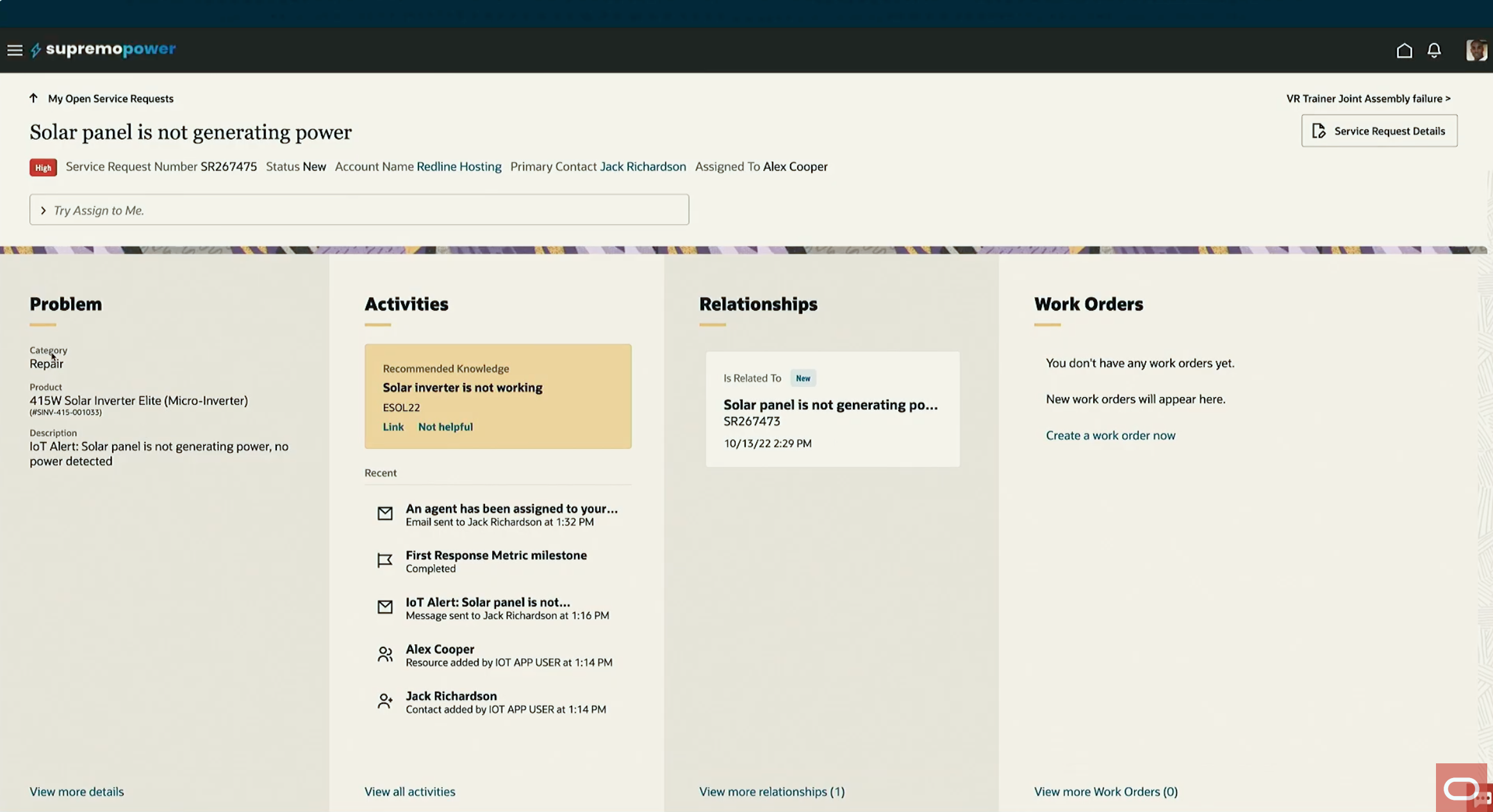
Service Center (B2B)
Solution
An AI enabled, extendable guided workflow experience for all types of customer service related issues and channels.
Impact
75%
Fewer screens
400
Customers
40k
Daily users
Clarity of purpose
The user
Customer Service Representative (CSR) are dealing with longer running asynchronous service requests which typically come in through email as well as synchronous interactions through phone and chat.
She is handling those service requests that are hard to automate which means she needs to investigate and troubleshoot the issue and facilitate communication between multiple internal resources and the customer.

User goal
As a customer service rep I need to cordially and swiftly resolve issues raised by customers through multiple channels, so the customers of their company are happy with the service provided and feel taken care of by the company.

Design principles
Throughout the design process we have always made sure that we stick to these 3 design principles.

Reduce stress
- Waiting can be stressful - especially when you are blocked from doing work

Control
- Being a CSR there are a lot of things you cannot control. But feeling in control is associated with a sense of satisfaction
- Make the CSR feel in control

Focus
- Let the CSR focus on the task at hand
- Reduce clutter
- Present one task and its related information only
- When context switching is necessary, minimize the switching cost
Cognitive load
Business software often wrongfully assumes that people at work can somehow handle more complex interfaces and workflows than they are used to outside of work.
We believe that business and consumer software are just software and should not be treated differently.

Learning curve
In high turnover environments, training the workforce is costly and time intensive. It takes a lot for people to learn and adapt to new tools, workflows and processes so we worked hard on lowering the learning curve and let the tool do the work for the user.
AI can help surfacing the right information at the right time, bringing it to the user rather than having the user hunt for the information.
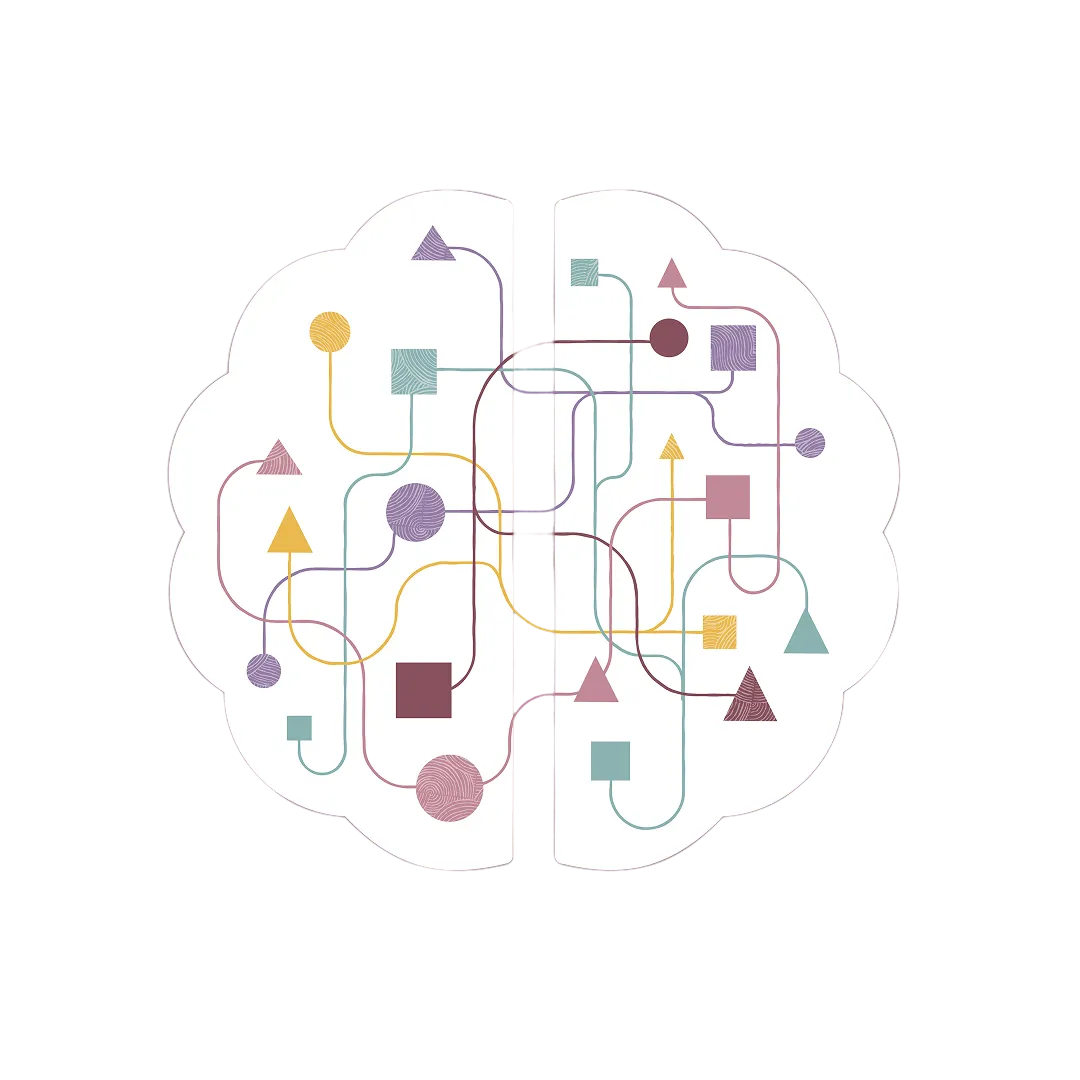
Different channel types

Service Requests
These are always issues that can’t be solved during a quick chat or call and therefore always asynchrony and typically involve multiple stake holders, troubleshooting or field service before it is solved.

Chat
Customer often have tried to find an answer on a company’s website before they are invited to chat with a human agent. Chats are mostly synchrony but can be asynchronous in cases a company supports WhatsApp or WeChat.

Phone
Customers calling in about an issue which by definition is always synchronous and either gets resolved during the call or a service request gets created in cases where follow up steps are required.
The starting point
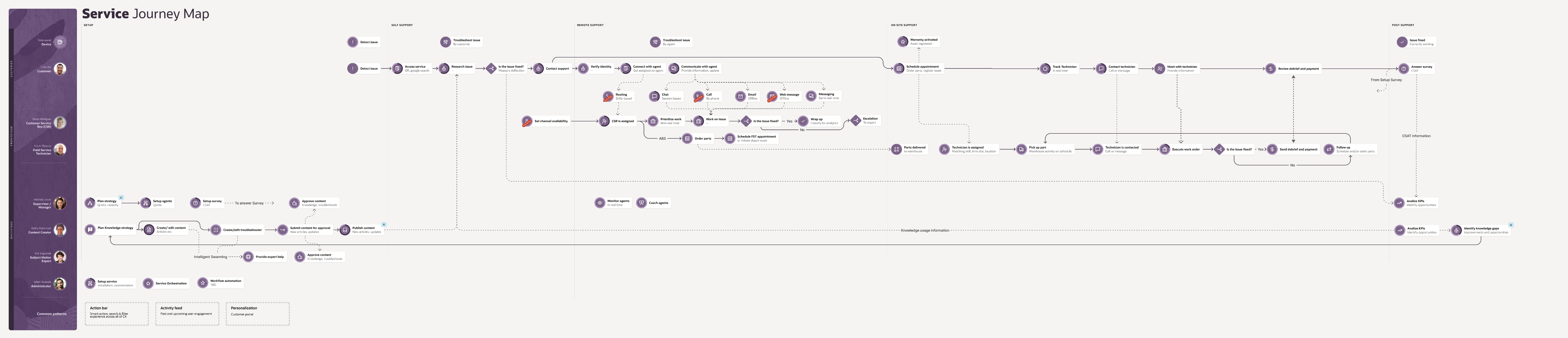
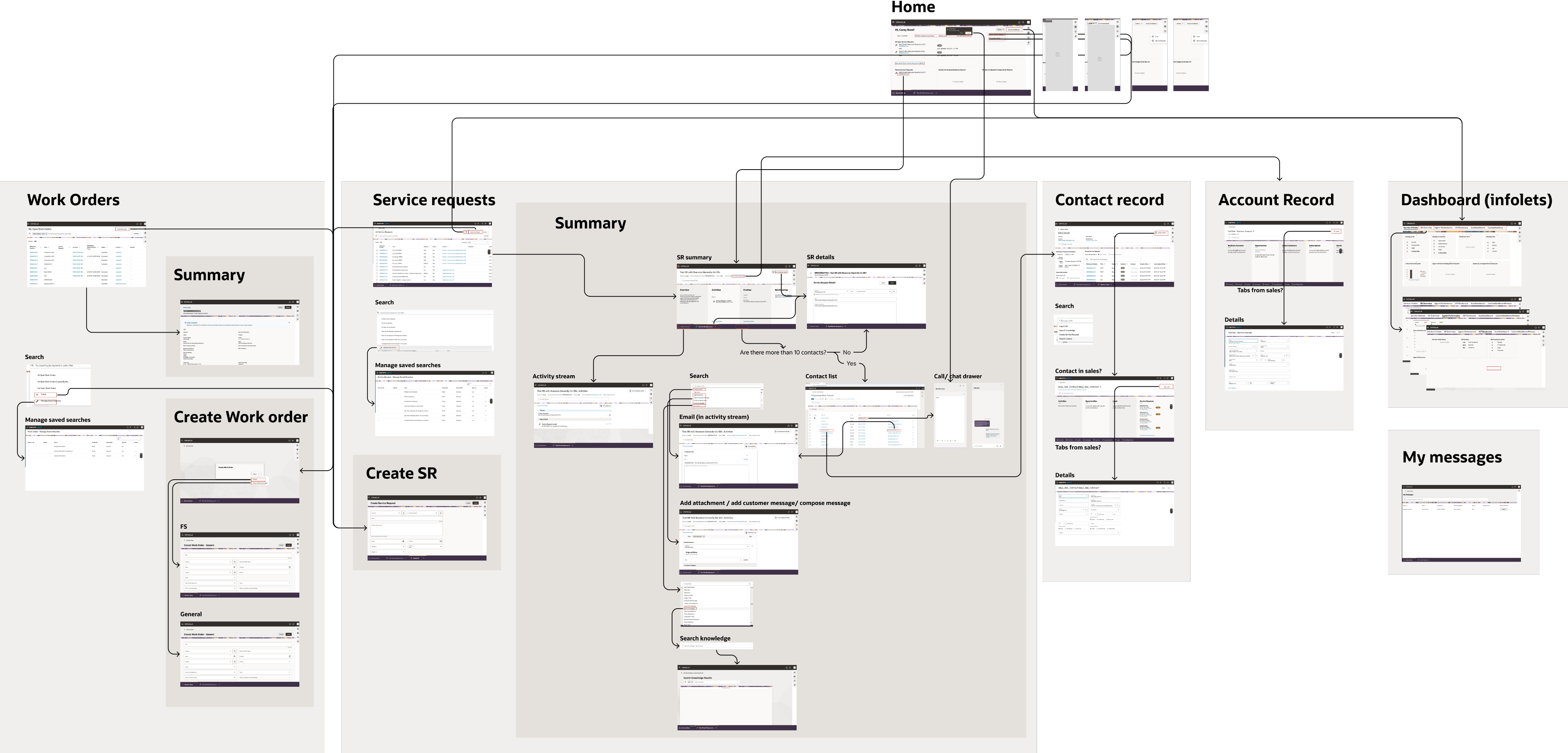
Through feedback from our customers and ride-along sessions with their and our own customer support representatives we have gotten valuable insights into their pain points.
We created a full journey map with all personas and products involved...
... as well as a full map of how the current CSR experience flows.

One AI powered tool for all customer service inquiries.
Introducing
Oracle Service Center


Now everything in one place.
In order to work on just one service request CSRs had to navigate between multiple pages with different sets of data and information. All this has been consolidated into one single-page experience. Reducing navigation and cognitive loads while increading productivity and
The Workspace
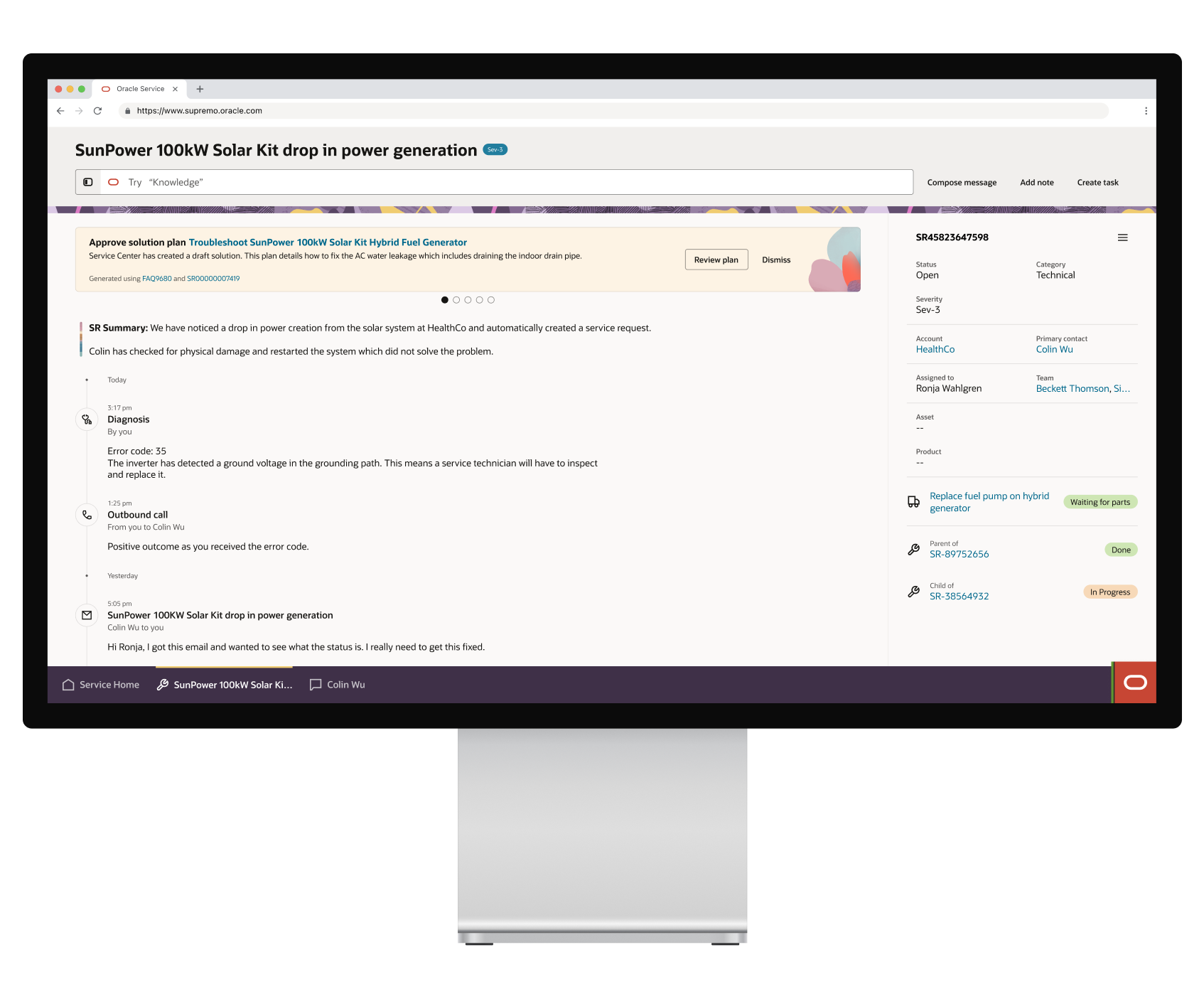
A single UI for all types of customer issues, regardless of the channel they chose to engage from. It provides a chronological view of the SR and guided process with smart AI-driven recommendations which are based on prior actions and communications.
17 agents and growing
Attachment processing agent
Clarification agent
Classification agent
Customer self-service
Knowledge authoring
Knowledge-based answer generation
Knowledge search assistant
Language translation agent
Notification agent
Self-service chat agent
SR creation agent
Resolution agent
Triage agent
Start-of-Day agent
SR Summary agent
Work Order agent
Work order scheduling agent
Human in the loop & AI workflows
Based on historic context, problem description, asset information and other parameters we are able to recommend the next best action the CSR should take and include the reasoning of why AI recommends this.
Share
Troubleshooter SunPower 100kW Solar Kit Hybrid Fuel Generator
Based on the provided error code and to better help the customer we need to narrow down the possible root cause. Please review the drafted email before sharing.
Generated using Error Code
Review
Dismiss
Taking a closer look
Service Request Details
Sometimes CSRs need to quickly edit or see lesser frequently used service request details. The Workspace surfaces the most important details at all times and provides a targeted navigation to those not included in the summary view.
User goal: Control
Taking action
Actions are taken in-line, whether selected from a recommended action or through the action bar. The selected action replaces any recommendation for the duration of that action to let the user focus on the task at hand.
User goal: Focus
One UI for for all service channels
Service Center accommodates all types of customer issues regardless of which channel they use.
User goal: Reduce stress
User feedback
“I love it and the following are the good factors
- UI responds is very fast
- Less clicks
- UI content display is well organized”
“Positives - Everything is on pne page: Milestones, Sub Status ect... ❤️”
“Love it, made out work very efficient”
“New SR view is soo much better”
“I like it as everything consolidates in single UI”
“I love the new UI, it makes our lives so much easier. Please don’t take it away 😊”
“Very positive - like all tabs being available on the same UI. Was very easy to transition to this layout and use it”
* The illustrative graphics shown in this project are not my creation and are part of Oracle’s Redwood branding.

Tim Gerlach
+1 (843) 617 0288

About me
Service Center
Service Center
My Role
Company
Team
Status
When
Design owner
Oracle
Anna Almberg, Akhil Oswal, Mariana Garcia
Shipped
2026
Problem
Traditional customer service applications are overwhelming and have a steep learning curve in an industry of high turnovers training is expensive. At the same time Oracle moved to a new design system and philosophy (Redwood) of what professional software experience should be like. It just had a limited number of page templates and components that were needed and unique to customer service use cases so the first version was overly complicated and did not satisfy customer’s needs.
Objective
Creating 1 application which can replace Oracle’s 3 existing customer service tools.
Custom internal service tool (B2B)
RightNow (B2C)
Service Center (B2B)
Solution
An AI enabled, extendable guided workflow experience for all types of customer service related issues and channels.
Impact
75%
Fewer screens
400
Customers
40k
Daily users
Clarity of purpose
The user
Customer Service Representative (CSR) are dealing with longer running asynchronous service requests which typically come in through email as well as synchronous interactions through phone and chat.
She is handling those service requests that are hard to automate which means she needs to investigate and troubleshoot the issue and facilitate communication between multiple internal resources and the customer.
User goal
As a customer service rep I need to cordially and swiftly resolve issues raised by customers through multiple channels, so the customers of their company are happy with the service provided and feel taken care of by the company.
Design principles
Throughout the design process we have always made sure that we stick to these 3 design principles.
Reduce stress
- Waiting can be stressful - especially when you are blocked from doing work
Control
- Being a CSR there are a lot of things you cannot control. But feeling in control is associated with a sense of satisfaction
- Make the CSR feel in control
Focus
- Let the CSR focus on the task at hand
- Reduce clutter
- Present one task and its related information only
- When context switching is necessary, minimize the switching cost
Cognitive load
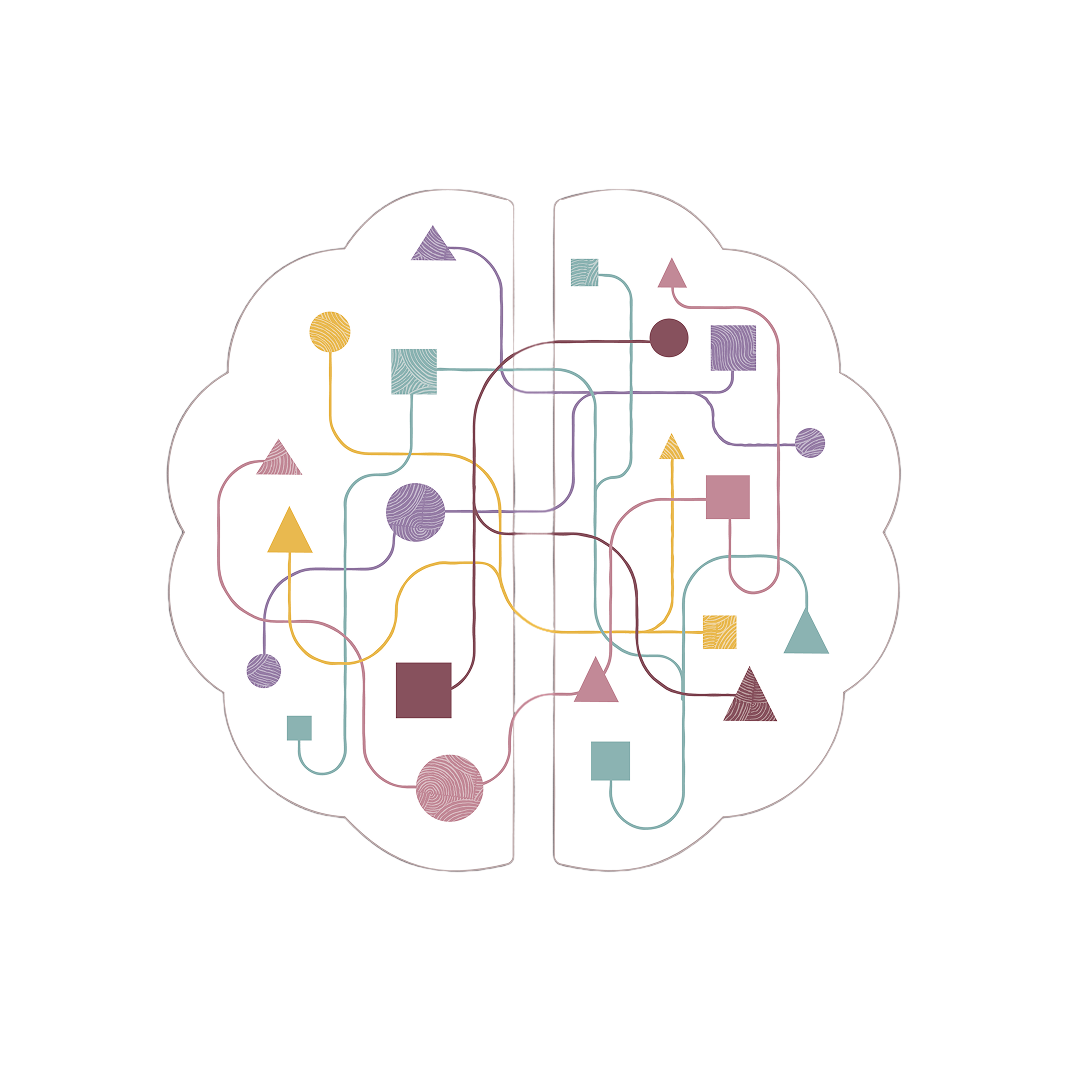
Business software often wrongfully assumes that people at work can somehow handle more complex interfaces and workflows than they are used to outside of work.
We believe that business and consumer software are just software and should not be treated differently.
Learning curve
In high turnover environments, training the workforce is costly and time intensive. It takes a lot for people to learn and adapt to new tools, workflows and processes so we worked hard on lowering the learning curve and let the tool do the work for the user.
AI can help surfacing the right information at the right time, bringing it to the user rather than having the user hunt for the information.
Different channel types
Service Requests
These are always issues that can’t be solved during a quick chat or call and therefore always asynchrony and typically involve multiple stake holders, troubleshooting or field service before it is solved.
Chat
Customer often have tried to find an answer on a company’s website before they are invited to chat with a human agent. Chats are mostly synchrony but can be asynchronous in cases a company supports WhatsApp or WeChat.
Phone
Customers calling in about an issue which by definition is always synchronous and either gets resolved during the call or a service request gets created in cases where follow up steps are required.
The starting point
Through feedback from our customers and ride-along sessions with their and our own customer support representatives we have gotten valuable insights into their pain points.
We created a full journey map with all personas and products involved...
... as well as a full map of how the current CSR experience flows.
One AI powered tool for all customer service inquiries.
Introducing
Oracle Service Center
Now everything in one place.
In order to work on just one service request CSRs had to navigate between multiple pages with different sets of data and information. All this has been consolidated into one single-page experience. Reducing navigation and cognitive loads while increading productivity and
The Workspace
A single UI for all types of customer issues, regardless of the channel they chose to engage from. It provides a chronological view of the SR and guided process with smart AI-driven recommendations which are based on prior actions and communications.
Anchoring information

Summary of what happened

Past activities

What I need to do next

17 agents and growing
Attachment processing agent
Clarification agent
Classification agent
Customer self-service
Knowledge authoring
Knowledge-based answer generation
Knowledge search assistant
Language translation agent
Notification agent
Self-service chat agent
SR creation agent
Resolution agent
Triage agent
Start-of-Day agent
SR Summary agent
Work Order agent
Work order scheduling agent
Human in the loop & AI workflows
Based on historic context, problem description, asset information and other parameters we are able to recommend the next best action the CSR should take and include the reasoning of why AI recommends this.
Share
Troubleshooter SunPower 100kW Solar Kit Hybrid Fuel Generator
Based on the provided error code and to better help the customer we need to narrow down the possible root cause. Please review the drafted email before sharing.
Generated using Error Code
Review
Dismiss
Taking a closer look
Service Request Details
Sometimes CSRs need to quickly edit or see lesser frequently used service request details. The Workspace surfaces the most important details at all times and provides a targeted navigation to those not included in the summary view.
User goal: Control
Taking action
Actions are taken in-line, whether selected from a recommended action or through the action bar. The selected action replaces any recommendation for the duration of that action to let the user focus on the task at hand.
User goal: Focus
One UI for for all service channels
Service Center accommodates all types of customer issues regardless of which channel they use.
User goal: Reduce stress
User feedback
“I love it and the following are the good factors
- UI responds is very fast
- Less clicks
- UI content display is well organized”
“Positives - Everything is on pne page: Milestones, Sub Status ect... ❤️”
“Love it, made out work very efficient”
“New SR view is soo much better”
“I like it as everything consolidates in single UI”
“I love the new UI, it makes our lives so much easier. Please don’t take it away 😊”
“Very positive - like all tabs being available on the same UI. Was very easy to transition to this layout and use it”
* The illustrative graphics shown in this project are not my creation and are part of Oracle’s Redwood branding.

Tim Gerlach
+1 (843) 617 0288

About me
Service Center
Service Center
My Role
Company
Team
Status
When
Design owner
Oracle
Anna Almberg, Akhil Oswal, Mariana Garcia
Shipped
2026
Problem
Traditional customer service applications are overwhelming and have a steep learning curve in an industry of high turnovers training is expensive. At the same time Oracle moved to a new design system and philosophy (Redwood) of what professional software experience should be like. It just had a limited number of page templates and components that were needed and unique to customer service use cases so the first version was overly complicated and did not satisfy customer’s needs.
Objective
Creating 1 application which can replace Oracle’s 3 existing customer service tools.
Custom internal service tool (B2B)
RightNow (B2C)
Service Center (B2B)
Solution
An AI enabled, extendable guided workflow experience for all types of customer service related issues and channels.
Impact
75%
Fewer screens
400
Customers
40k
Daily users
Clarity of purpose
The user
Customer Service Representative (CSR) are dealing with longer running asynchronous service requests which typically come in through email as well as synchronous interactions through phone and chat.
She is handling those service requests that are hard to automate which means she needs to investigate and troubleshoot the issue and facilitate communication between multiple internal resources and the customer.
User goal
As a customer service rep I need to cordially and swiftly resolve issues raised by customers through multiple channels, so the customers of their company are happy with the service provided and feel taken care of by the company.
Design principles
Throughout the design process we have always made sure that we stick to these 3 design principles.
Reduce stress
- Waiting can be stressful - especially when you are blocked from doing work
Control
- Being a CSR there are a lot of things you cannot control. But feeling in control is associated with a sense of satisfaction
- Make the CSR feel in control
Focus
- Let the CSR focus on the task at hand
- Reduce clutter
- Present one task and its related information only
- When context switching is necessary, minimize the switching cost
Cognitive load
Business software often wrongfully assumes that people at work can somehow handle more complex interfaces and workflows than they are used to outside of work.
We believe that business and consumer software are just software and should not be treated differently.
Learning curve
In high turnover environments, training the workforce is costly and time intensive. It takes a lot for people to learn and adapt to new tools, workflows and processes so we worked hard on lowering the learning curve and let the tool do the work for the user.
AI can help surfacing the right information at the right time, bringing it to the user rather than having the user hunt for the information.
Different channel types
Service Requests
These are always issues that can’t be solved during a quick chat or call and therefore always asynchrony and typically involve multiple stake holders, troubleshooting or field service before it is solved.
Chat
Customer often have tried to find an answer on a company’s website before they are invited to chat with a human agent. Chats are mostly synchrony but can be asynchronous in cases a company supports WhatsApp or WeChat.
Phone
Customers calling in about an issue which by definition is always synchronous and either gets resolved during the call or a service request gets created in cases where follow up steps are required.
The starting point
Through feedback from our customers and ride-along sessions with their and our own customer support representatives we have gotten valuable insights into their pain points.
We created a full journey map with all personas and products involved...
... as well as a full map of how the current CSR experience flows.
One AI powered tool for all customer service inquiries.
Introducing
Oracle Service Center
Now everything in one place.
In order to work on just one service request CSRs had to navigate between multiple pages with different sets of data and information. All this has been consolidated into one single-page experience. Reducing navigation and cognitive loads while increading productivity and
The Workspace
A single UI for all types of customer issues, regardless of the channel they chose to engage from. It provides a chronological view of the SR and guided process with smart AI-driven recommendations which are based on prior actions and communications.
Anchoring information

Summary of what happened

Past activities

What I need to do next

17 agents and growing
Attachment processing agent
Clarification agent
Classification agent
Customer self-service
Knowledge authoring
Knowledge-based answer generation
Knowledge search assistant
Language translation agent
Notification agent
Self-service chat agent
SR creation agent
Resolution agent
Triage agent
Start-of-Day agent
SR Summary agent
Work Order agent
Work order scheduling agent
Human in the loop & AI workflows
Based on historic context, problem description, asset information and other parameters we are able to recommend the next best action the CSR should take and include the reasoning of why AI recommends this.
Share
Troubleshooter SunPower 100kW Solar Kit Hybrid Fuel Generator
Based on the provided error code and to better help the customer we need to narrow down the possible root cause. Please review the drafted email before sharing.
Generated using Error Code
Review
Dismiss
Taking a closer look
Service Request Details
Sometimes CSRs need to quickly edit or see lesser frequently used service request details. The Workspace surfaces the most important details at all times and provides a targeted navigation to those not included in the summary view.
User goal: Control
Taking action
Actions are taken in-line, whether selected from a recommended action or through the action bar. The selected action replaces any recommendation for the duration of that action to let the user focus on the task at hand.
User goal: Focus
One UI for for all service channels
Service Center accommodates all types of customer issues regardless of which channel they use.
User goal: Reduce stress
User feedback
“I love it and the following are the good factors
- UI responds is very fast
- Less clicks
- UI content display is well organized”
“Positives - Everything is on pne page: Milestones, Sub Status ect... ❤️”
“Love it, made out work very efficient”
“New SR view is soo much better”
“I like it as everything consolidates in single UI”
“I love the new UI, it makes our lives so much easier. Please don’t take it away 😊”
“Very positive - like all tabs being available on the same UI. Was very easy to transition to this layout and use it”
* The illustrative graphics shown in this project are not my creation and are part of Oracle’s Redwood branding.

Tim Gerlach
+1 (843) 617 0288

About me
Service Center
Service Center
My Role
Company
Team
Status
When
Design owner
Oracle
Anna Almberg, Akhil Oswal, Mariana Garcia
Shipped
2026
Problem
Traditional customer service applications are overwhelming and have a steep learning curve in an industry of high turnovers training is expensive. At the same time Oracle moved to a new design system and philosophy (Redwood) of what professional software experience should be like. It just had a limited number of page templates and components that were needed and unique to customer service use cases so the first version was overly complicated and did not satisfy customer’s needs.
Objective
Creating 1 application which can replace Oracle’s 3 existing customer service tools.
Custom internal service tool (B2B)
RightNow (B2C)
Service Center (B2B)
Solution
An AI enabled, extendable guided workflow experience for all types of customer service related issues and channels.
Impact
75%
Fewer screens
400
Customers
40k
Daily users
Clarity of purpose
The user
Customer Service Representative (CSR) are dealing with longer running asynchronous service requests which typically come in through email as well as synchronous interactions through phone and chat.
She is handling those service requests that are hard to automate which means she needs to investigate and troubleshoot the issue and facilitate communication between multiple internal resources and the customer.
User goal
As a customer service rep I need to cordially and swiftly resolve issues raised by customers through multiple channels, so the customers of their company are happy with the service provided and feel taken care of by the company.
Design principles
Throughout the design process we have always made sure that we stick to these 3 design principles.
Reduce stress
- Waiting can be stressful - especially when you are blocked from doing work
Control
- Being a CSR there are a lot of things you cannot control. But feeling in control is associated with a sense of satisfaction
- Make the CSR feel in control
Focus
- Let the CSR focus on the task at hand
- Reduce clutter
- Present one task and its related information only
- When context switching is necessary, minimize the switching cost
Cognitive load
Business software often wrongfully assumes that people at work can somehow handle more complex interfaces and workflows than they are used to outside of work.
We believe that business and consumer software are just software and should not be treated differently.
Learning curve
In high turnover environments, training the workforce is costly and time intensive. It takes a lot for people to learn and adapt to new tools, workflows and processes so we worked hard on lowering the learning curve and let the tool do the work for the user.
AI can help surfacing the right information at the right time, bringing it to the user rather than having the user hunt for the information.
Different channel types
Service Requests
These are always issues that can’t be solved during a quick chat or call and therefore always asynchrony and typically involve multiple stake holders, troubleshooting or field service before it is solved.
Chat
Customer often have tried to find an answer on a company’s website before they are invited to chat with a human agent. Chats are mostly synchrony but can be asynchronous in cases a company supports WhatsApp or WeChat.
Phone
Customers calling in about an issue which by definition is always synchronous and either gets resolved during the call or a service request gets created in cases where follow up steps are required.
The starting point
Through feedback from our customers and ride-along sessions with their and our own customer support representatives we have gotten valuable insights into their pain points.
We created a full journey map with all personas and products involved...
... as well as a full map of how the current CSR experience flows.
Introducing
Oracle Service Center
One AI powered tool for all customer service inquiries.
Now everything in one place.
In order to work on just one service request CSRs had to navigate between multiple pages with different sets of data and information. All this has been consolidated into one single-page experience. Reducing navigation and cognitive loads while increasing productivity by providing all necessary information at first glance.
The Workspace
A single UI for all types of customer issues, regardless of the channel they chose to engage from. It provides a chronological view of the SR and guided process with smart AI-driven recommendations which are based on prior actions and communications.
Past activities

Summary of what happened
What I need to do next
Anchoring information

17 agents and growing
Attachment processing agent
Clarification agent
Classification agent
Customer self-service
Knowledge authoring
Knowledge-based answer generation
Knowledge search assistant
Language translation agent
Notification agent
Self-service chat agent
SR creation agent
Resolution agent
Triage agent
Start-of-Day agent
SR Summary agent
Work Order agent
Work order scheduling agent
Human in the loop & AI workflows
Based on historic context, problem description, asset information and other parameters we are able to recommend the next best action the CSR should take and include the reasoning of why AI recommends this.
Share
Troubleshooter SunPower 100kW Solar Kit Hybrid Fuel Generator
Based on the provided error code and to better help the customer we need to narrow down the possible root cause. Please review the drafted email before sharing.
Generated using Error Code
Review
Dismiss
Taking a closer look
Service Request Details
Sometimes CSRs need to quickly edit or see lesser frequently used service request details. The Workspace surfaces the most important details at all times and provides a targeted navigation to those not included in the summary view.
User goal: Control
Taking action
Actions are taken in-line, whether selected from a recommended action or through the action bar. The selected action replaces any recommendation for the duration of that action to let the user focus on the task at hand.
User goal: Focus
One UI for for all service channels
Service Center accommodates all types of customer issues regardless of which channel they use.
User goal: Reduce stress
User feedback
“I love it and the following are the good factors
- UI responds is very fast
- Less clicks
- UI content display is well organized”
“Positives - Everything is on pne page: Milestones, Sub Status ect... ❤️”
“Love it, made out work very efficient”
“New SR view is soo much better”
“I like it as everything consolidates in single UI”
“I love the new UI, it makes our lives so much easier. Please don’t take it away 😊”
“Very positive - like all tabs being available on the same UI. Was very easy to transition to this layout and use it”
* The illustrative graphics shown in this project are not my creation and are part of Oracle’s Redwood branding.
Tim Gerlach
+1 (843) 617 0288