About me
Admin platform

Admin Platform
My Role
Company
Team
Status
When
UI/ UX lead
NCR
Keerthi Nandakumar
Shipped
2022
Problem
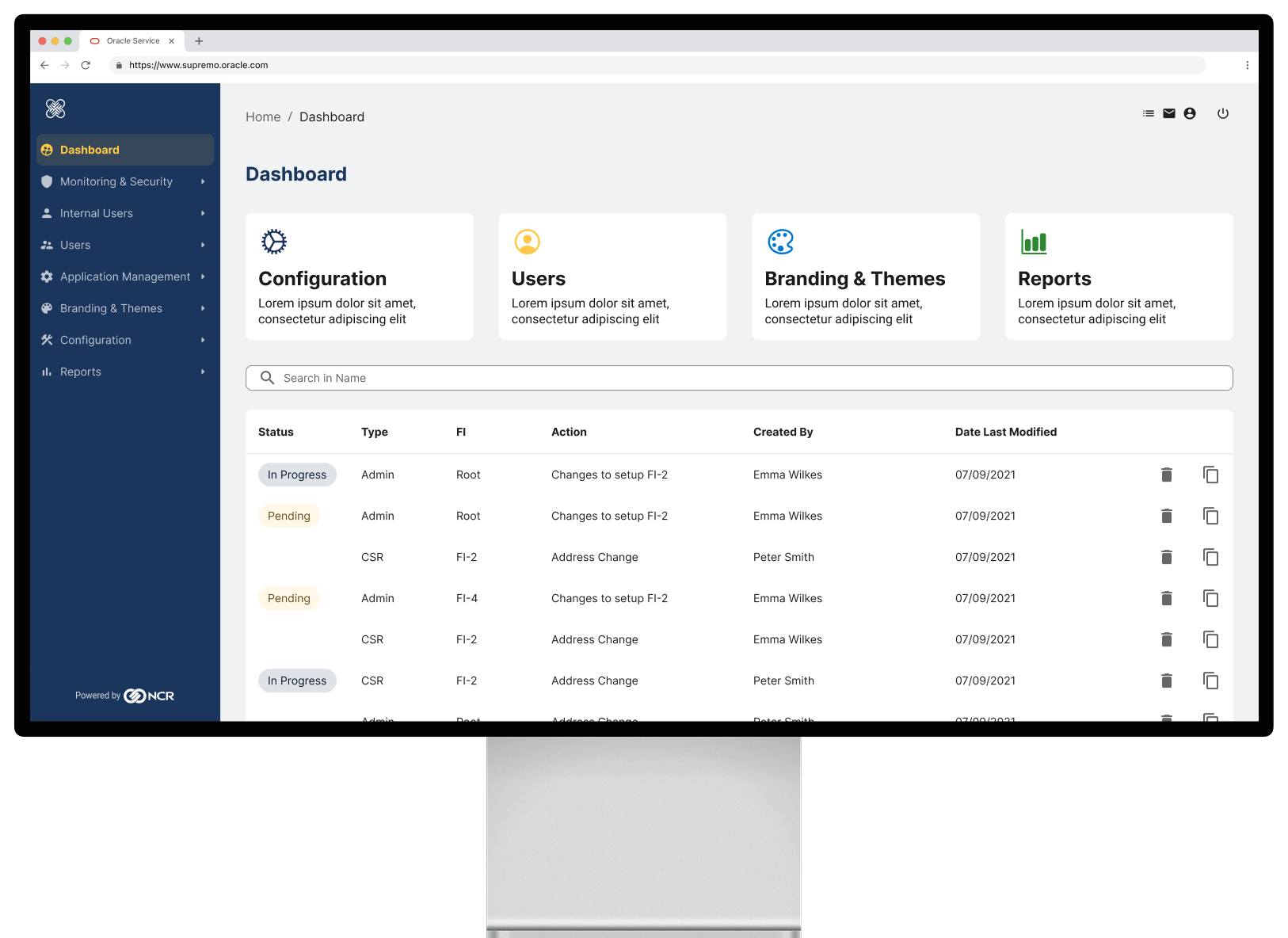
A well engineered and very capable legacy product without any form of design input had to be integrated into the NCR banking family of products. This had to be done without compromising existing functionality and customer extensions and customizations.
Solution
A part visual uplift where new components where introduced as well as a careful and deliberate break in navigation which does not technically change the existing product but signals to the user that a change has accured.
Achievements
5
>
3
Levels of navigation
100%
Design system components
3
New interaction patterns
The Basics
Main Users

Admin
Admins have the most access rights and they can do anything from creating segments, managing permissions, creating themes and much more.

Supervisor
Supervisors control multiple customer service representatives and have a higher level view over their activities and and more access permissions.

Customer Service Rep.
CSRs are helping customers with their daily tasks and problems. They can see customer profiles and exchange secure messages with them if needed.
Capable product. No Design
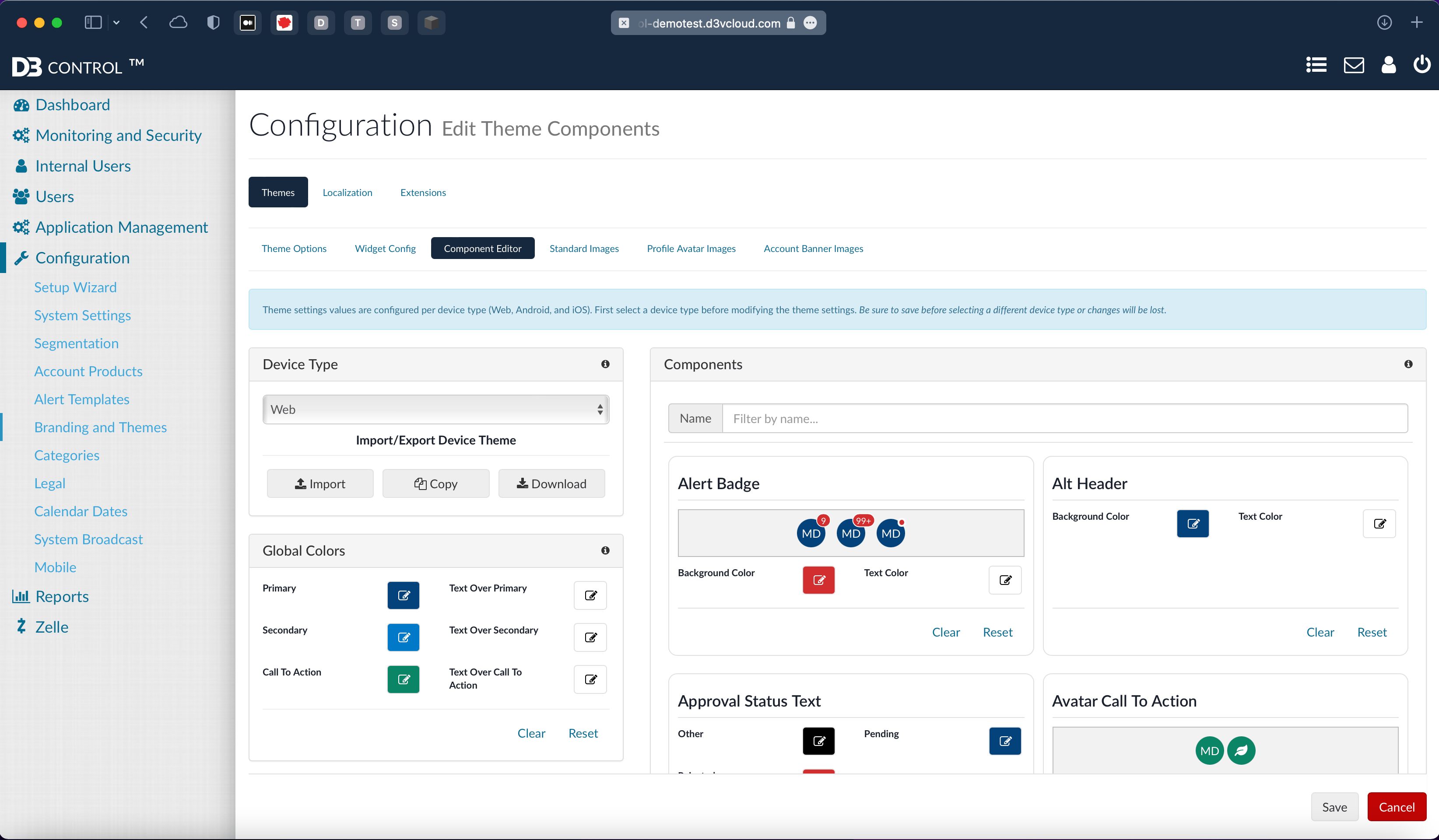
The existing product has been engineered but never designed. So today we have pages with 4 or more levels of navigation on one page, without any obvious way to navigate forward and backwards.
Furthermore, menu items are not where users expect them to be and every screen is very busy and noisy.
Discovery
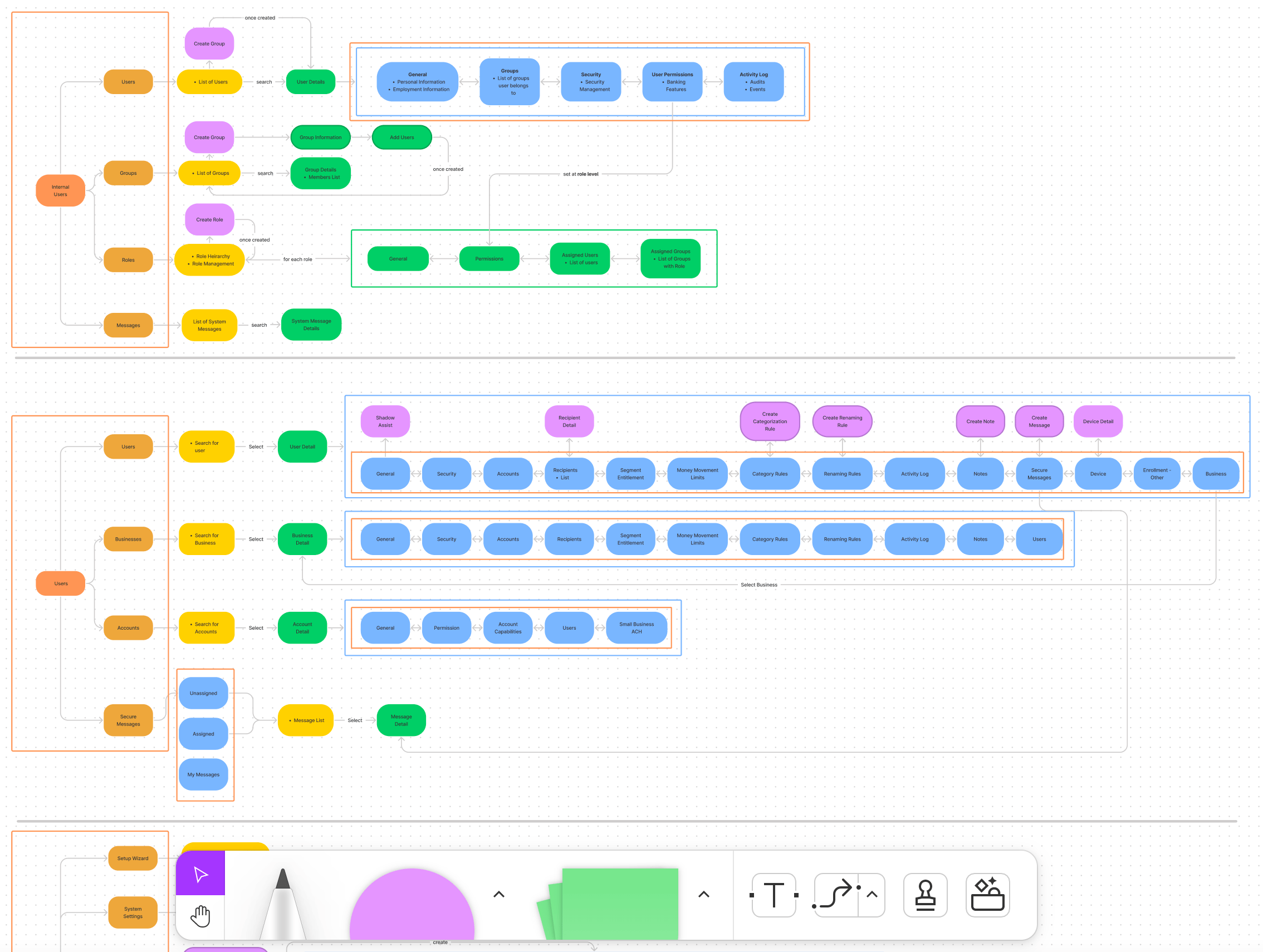
We examined the entire existing IA, realigned, renamed and simplified the structure.
New patterns and navigation behaviors have been defined through constant user testing.
Patterns
Progressive Navigation
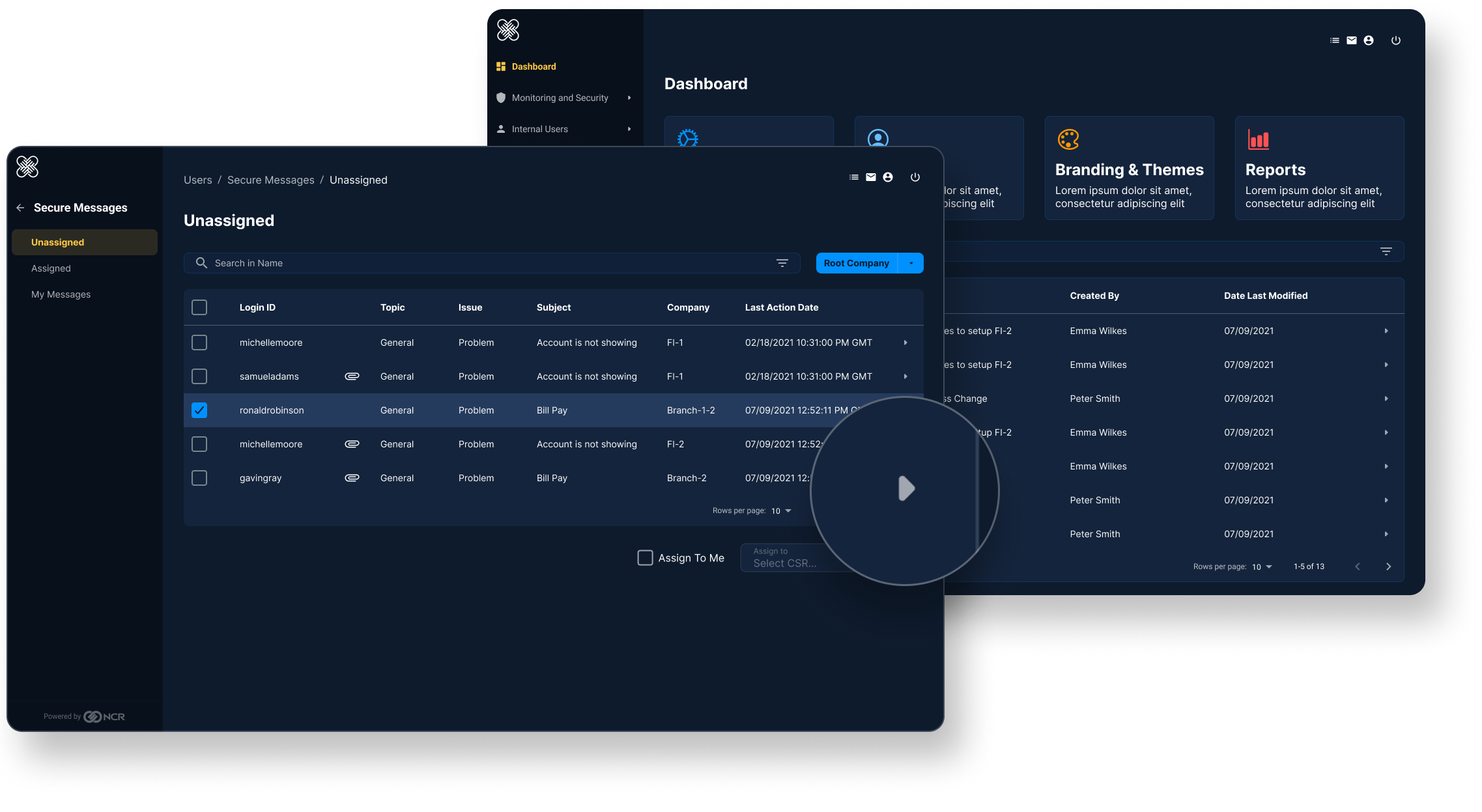
In an effort to reduce complexity the new admin platform features a progressive navigation, only showing relevant menu options at each given time.
Breadcrumbs further help with orientation and provide a way to quickly jump back to a higher level.
Full Page Takeover
These help to visually indicate the grouping and relationship of sub-navigation items.
The user opens a customers’ profile on a full page takeover, like opening someone’s file, providing a new level of side navigation without confusing
the user how they got here and how to exit out of the flow.
Drawer Navigation
Simple back and forth navigation can still exist on drawers, but it is not possible to navigate multiple levels down.
Visual Indicators
Throughout our products, arrows indicate further information and navigation to a deeper level.
Branding & Themes
Creating Themes
Apply themes to one or multiple segments to target a specific user group or test multiple themes against one another.
Global settings
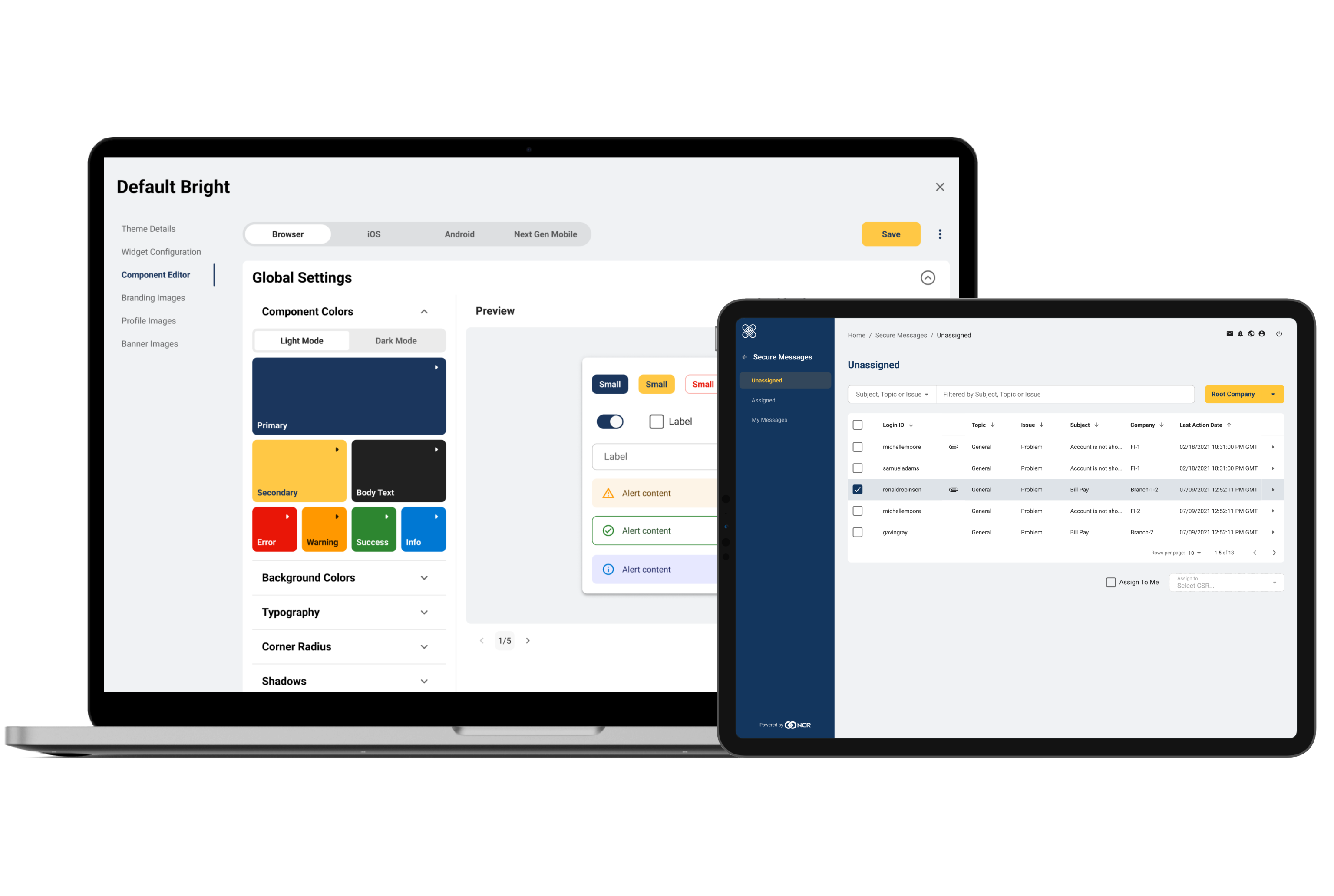
Clients can fully customize the experience of their banking app through the branding & theming tool.
Component editor
Individual components can be further customize
and override global settings
Key learnings
- Re-arrange and categorize an existing information architecture without regressions
- Building partnerships with those who have build the original product (product managers and engineer)
- Finding common ground and focus on the bigger picture

Tim Gerlach
+1 (843) 617 0288

About me
Admin platform
Admin Platform
My Role
Company
Team
Status
When
UI/ UX lead
NCR
Keerthi Nandakumar
Shipped
2022
Problem
A well engineered and very capable legacy product without any form of design input had to be integrated into the NCR banking family of products. This had to be done without compromising existing functionality and customer extensions and customizations.
Solution
A part visual uplift where new components where introduced as well as a careful and deliberate break in navigation which does not technically change the existing product but signals to the user that a change has accured.
Achievements
5
>
3
Levels of navigation
100%
Design system components
3
New interaction patterns
The Basics
Main Users
Admin
Admins have the most access rights and they can do anything from creating segments, managing permissions, creating themes and much more.
Supervisor
Supervisors control multiple customer service representatives and have a higher level view over their activities and and more access permissions.
Customer Service Rep.
CSRs are helping customers with their daily tasks and problems. They can see customer profiles and exchange secure messages with them if needed.
Capable product. No Design
The existing product has been engineered but never designed. So today we have pages with 4 or more levels of navigation on one page, without any obvious way to navigate forward and backwards.
Furthermore, menu items are not where users expect them to be and every screen is very busy and noisy.
Discovery
We examined the entire existing IA, realigned, renamed and simplified the structure.
New patterns and navigation behaviors have been defined through constant user testing.
Patterns
Progressive Navigation
In an effort to reduce complexity the new admin platform features a progressive navigation, only showing relevant menu options at each given time.
Breadcrumbs further help with orientation and provide a way to quickly jump back to a higher level.
Full Page Takeover
These help to visually indicate the grouping and relationship of sub-navigation items.
The user opens a customers’ profile on a full page takeover, like opening someone’s file, providing a new level of side navigation without confusing
the user how they got here and how to exit out of the flow.
Drawer Navigation
Simple back and forth navigation can still exist on drawers, but it is not possible to navigate multiple levels down.
Visual Indicators
Throughout our products, arrows indicate further information and navigation to a deeper level.
Branding & Themes
Creating Themes
Apply themes to one or multiple segments to target a specific user group or test multiple themes against one another.
Global settings
Clients can fully customize the experience of their banking app through the branding & theming tool.
Component editor
Individual components can be further customize
and override global settings
Key learnings
- Re-arrange and categorize an existing information architecture without regressions
- Building partnerships with those who have build the original product (product managers and engineer)
- Finding common ground and focus on the bigger picture

Tim Gerlach
+1 (843) 617 0288

About me
Admin platform
Admin Platform
My Role
Company
Team
Status
When
UI/ UX lead
NCR
Keerthi Nandakumar
Shipped
2022
Problem
A well engineered and very capable legacy product without any form of design input had to be integrated into the NCR banking family of products. This had to be done without compromising existing functionality and customer extensions and customizations.
Solution
A part visual uplift where new components where introduced as well as a careful and deliberate break in navigation which does not technically change the existing product but signals to the user that a change has accured.
Achievements
5
>
3
Levels of navigation
100%
Design system components
3
New interaction patterns
The Basics
Main Users
Admin
Admins have the most access rights and they can do anything from creating segments, managing permissions, creating themes and much more.
Supervisor
Supervisors control multiple customer service representatives and have a higher level view over their activities and and more access permissions.
Customer Service Rep.
CSRs are helping customers with their daily tasks and problems. They can see customer profiles and exchange secure messages with them if needed.
Capable product. No Design
The existing product has been engineered but never designed. So today we have pages with 4 or more levels of navigation on one page, without any obvious way to navigate forward and backwards.
Furthermore, menu items are not where users expect them to be and every screen is very busy and noisy.
Discovery
We examined the entire existing IA, realigned, renamed and simplified the structure.
New patterns and navigation behaviors have been defined through constant user testing.
Patterns
Progressive Navigation
In an effort to reduce complexity the new admin platform features a progressive navigation, only showing relevant menu options at each given time.
Breadcrumbs further help with orientation and provide a way to quickly jump back to a higher level.
Full Page Takeover
These help to visually indicate the grouping and relationship of sub-navigation items.
The user opens a customers’ profile on a full page takeover, like opening someone’s file, providing a new level of side navigation without confusing
the user how they got here and how to exit out of the flow.
Drawer Navigation
Simple back and forth navigation can still exist on drawers, but it is not possible to navigate multiple levels down.
Visual Indicators
Throughout our products, arrows indicate further information and navigation to a deeper level.
Branding & Themes
Creating Themes
Apply themes to one or multiple segments to target a specific user group or test multiple themes against one another.
Global settings
Clients can fully customize the experience of their banking app through the branding & theming tool.
Component editor
Individual components can be further customize
and override global settings
Key learnings
- Re-arrange and categorize an existing information architecture without regressions
- Building partnerships with those who have build the original product (product managers and engineer)
- Finding common ground and focus on the bigger picture

Tim Gerlach
+1 (843) 617 0288

About me
Admin platform
Admin Platform
My Role
Company
Team
Status
When
UI/ UX lead
NCR
Keerthi Nandakumar
Shipped
2022
Problem
A well engineered and very capable legacy product without any form of design input had to be integrated into the NCR banking family of products. This had to be done without compromising existing functionality and customer extensions and customizations.
Solution
A part visual uplift where new components where introduced as well as a careful and deliberate perceived break in navigation which does not technically change the existing product but signals to the user that a change has occurred.
Achievements
5
>
3
Levels of navigation
100%
Design system components
3
New interaction patterns
The Basics
Main Users
Admin
Admins have the most access rights and they can do anything from creating segments, managing permissions, creating themes and much more.
Supervisor
Supervisors control multiple customer service representatives and have a higher level view over their activities and and more access permissions.
Customer Service Rep.
CSRs are helping customers with their daily tasks and problems. They can see customer profiles and exchange secure messages with them if needed.
Capable product. No Design
The existing product has been engineered but never designed. So today we have pages with 4 or more levels of navigation on one page, without any obvious way to navigate forward and backwards.
Furthermore, menu items are not where users expect them to be and every screen is very busy and noisy.
Discovery
We examined the entire existing IA, realigned, renamed and simplified the structure.
New patterns and navigation behaviors have been defined through constant user testing.
Patterns
Progressive Navigation
In an effort to reduce complexity the new admin platform features a progressive navigation, only showing relevant menu options at each given time.
Breadcrumbs further help with orientation and provide a way to quickly jump back to a higher level.
Full Page Takeover
These help to visually indicate the grouping and relationship of sub-navigation items.
The user opens a customers’ profile on a full page takeover, like opening someone’s file, providing a new level of side navigation without confusing
the user how they got here and how to exit out of the flow.
Drawer Navigation
Simple back and forth navigation can still exist on drawers, but it is not possible to navigate multiple levels down.
Visual Indicators
Throughout our products, arrows indicate further information and navigation to a deeper level.
Branding & Themes
Creating Themes
Apply themes to one or multiple segments to target a specific user group or test multiple themes against one another.
Global settings
Clients can fully customize the experience of their banking app through the branding & theming tool.
Component editor
Individual components can be further customize
and override global settings
Key learnings
- Re-arrange and categorize an existing information architecture without regressions
- Building partnerships with those who have build the original product (product managers and engineer)
- Finding common ground and focus on the bigger picture
Tim Gerlach
+1 (843) 617 0288